StreetSoccer Controls
Learn inputs in-game. This page covers habits, platforms, and what we refuse to invent.
Batata Studs did not print a PC keybind table on the StreetSoccer Roblox page. Many fan articles will still paste Realistic Street Soccer’s list (hold click to shoot, Q dribble, E tackle, Shift sprint). Those binds may or may not match this career title. Copying them as fact would be a lie. This guide tells you where to learn the real binds and which habits show up in official art.
Where the real controls live
- Academy lessons — the listing puts “Learn to Play” on the same level as Career and Kick Off. Open lessons until shoot, pass, tackle, and sprint have on-screen prompts. Details: Academy.
- Free training / Practice Match — repeat the prompt without a crowd. Game modes.
- Mobile HUD — on-screen buttons. If a lesson names a button, that name beats a PC blog post.
- Settings — look for a controls or keybind screen after you spawn. If it exists, screenshot it; that is more reliable than this paragraph.
When the studio publishes binds, this page will gain a table. Until then, the table stays empty on purpose.
What official images do show
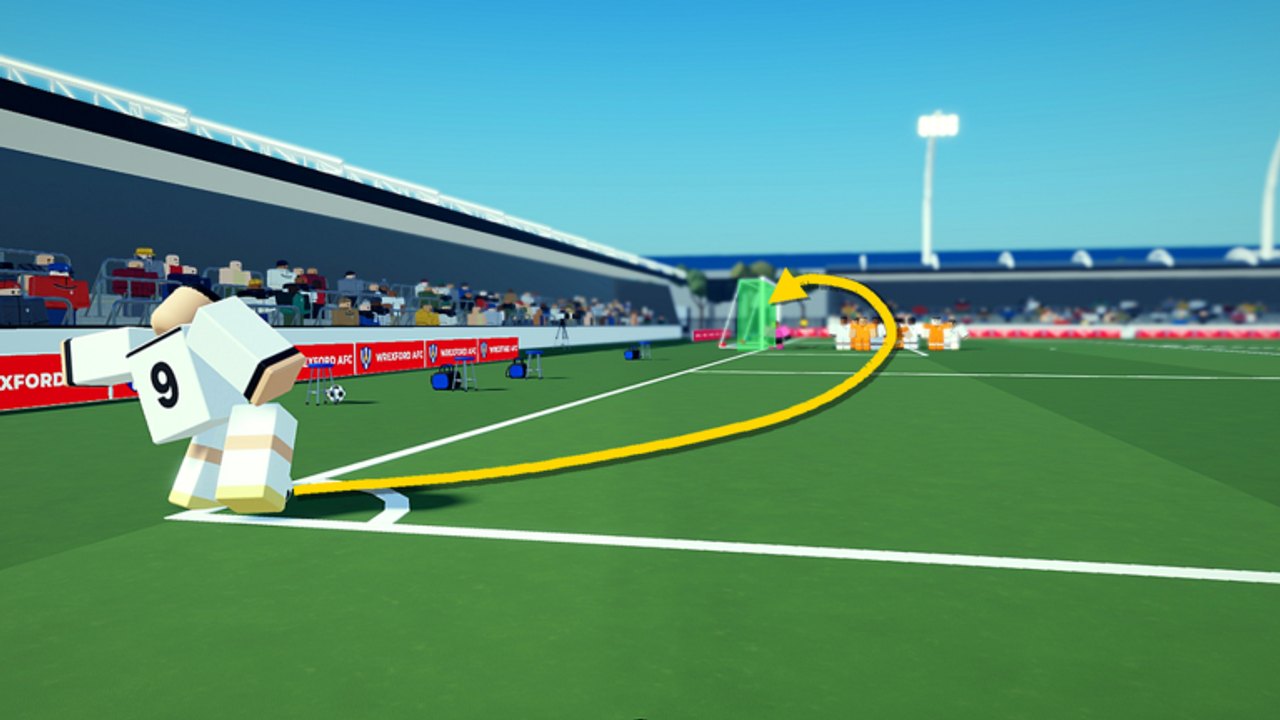
- A yellow shot trajectory bending toward the far side of the goal, with a striker in a white 9 kit. Shooting is not only power; it is aimed curve.
- Players airborne in the box in STREET SOCCER kits — expect jump / header / volley timing even if we will not guess the key.
- A goalkeeper chest-thump celebration — GK is a full control set (dive, catch, throw) you should learn in Academy instead of quitting the role.
- R6 avatars (universe avatar type MorphToR6). If a tutorial tells you to switch R15 for “better hitboxes,” that advice belongs to other games.
Platform notes
PC: Mouse-aim games usually separate look direction from run direction. Spend five minutes in training only rotating the camera onto the far post. The yellow-curve screenshot is a camera problem as much as a shoot problem.
Mobile: Thumb HUD. Sit the device so sprint and shoot are not the same accidental swipe. Play Academy on mobile if that is your main platform — PC lessons will not teach you the button layout.
Console: Supported at the Roblox layer. Use the in-game prompts; do not assume Xbox binds from Street Soccer Pro wikis.
Server size 50: Extra latency appears when instances fill. Time your tackle on the ball, not on a lagged silhouette.
Habits that do not depend on a letter key
These ideas survive whatever the bind is:
- Pass early in 5v5. The getting-started screenshot is a pile-up; extra power shots from traffic are turnovers.
- Far-post thought on the shot overlay. Inside the near post is the first save a keeper makes.
- Sprint as a resource. Gym exists in the listing because stamina is a system. If you hold sprint from box to box in 11v11 you will arrive late to the second ball.
- Do not dive as GK at every feint. The celebration still is for a save you chose, not a panic animation.
- Practice Match is where you bind muscle memory. Public 11v11 is where you spend it.
Controls versus scripts
Auto-shoot and auto-GK scripts advertised for other soccer games will not “fix” your binds. They attach to different remotes and can ban the career save. See scripts.
Training plan for inputs
- Academy: identify shoot, pass, sprint, tackle, jump.
- Training: 20 far-post shots using the same look direction as the yellow-curve art.
- Practice Match: only pass forward if a teammate is facing goal.
- 5v5 Kick Off: one new habit per match.
- Grounds court: pressure test without a long walk back.
If a friend swears the bind is “the same as RSS,” verify in this Academy. Then play. The position tier list assumes you already know how to strike the ball, not which keyboard letter you used.
Frequently Asked Questions
Quick answers for StreetSoccer on Roblox.
What are the official StreetSoccer PC keybinds?
The Roblox listing does not publish them. Learn shoot, pass, tackle, and sprint from Academy prompts.
Can I use Realistic Street Soccer controls here?
Do not assume they match. Open StreetSoccer Academy and follow on-screen names.
How do I shoot with curve?
Official art shows a yellow far-post arc. Practice camera aim in training; do not download an aimbot.
Are controls different on mobile?
You get a HUD instead of keys. Train on the same device you will play Kick Off on.